


Xero Accounting for business
4.6235.00 Reviews
App Specs
- Version
- 3.209.0 - Release
- Updated On
- License
- Free
- Downloads
- 1,000,000+
- Developer
- Xero Accounting
- Categories
- Business
- Platform
- Android
Screenshots
 Analysis by AppCompare
I judge an accounting app less by how polished its first screen looks than by whether it helps me keep ordinary business decisions grounded in current records. Xero Accounting is a business app from Xero Accounting, and it brings bookkeeping tasks such as invoicing and expense tracking onto a phone. Its 4.6 average across around 19,000 ratings suggests many people find it useful, though a rating alone cannot tell you whether its workflow fits your business. I see it as a practical companion to a bookkeeping routine, not a substitute for understanding what is being recorded.
A good fit for a particular kind of business
I’d consider it if I run a small business, send invoices, deal with recurring expenses, and want to check financial activity while away from a desk. It is especially useful when bookkeeping happens in short gaps between client work: I can handle a small administrative task while the details are still fresh instead of leaving a pile of receipts and reminders for later.
It may be less suitable if I only need a basic way to note income and spending, or if I expect an app to decide how every transaction should be classified. Accounting software works best when I understand my own categories and review what it records. For a business with unusual accounting needs, complicated approval processes, or a strong preference for a different bookkeeping system, I would compare options carefully before moving established records.
How it compares with familiar alternatives
Compared with a spreadsheet, Xero offers a more connected place for invoices, expenses, and bank activity, which can reduce repeated copying between separate files. A spreadsheet can still be the better choice for a very simple operation where flexibility matters more than automation and there are few transactions to manage. A dedicated receipt tracker may also feel faster if receipt capture is the only task I want to solve; Xero makes more sense when I want those expense details to sit alongside the wider bookkeeping picture.
Its reach is substantial: the app has over one million installs and is free to download, with in-app purchases ranging from about fifty cents to ninety dollars per item. That makes the initial download easy to try, but I would check the current plan and purchase details before building my business process around it. It is rated for everyone, and the version identified as 3.209.0 - Release requires Android 9 or later. Those points matter when choosing a device and deciding whether the app can be part of a longer-term workflow.
Keeping the books usable day to day
The most helpful way I can use Xero is as a small, repeatable routine rather than a last-minute rescue tool. I would create invoices when the work is agreed or completed, record expenses while I still remember what they were for, and set aside a regular time to review bank activity. The value is not just having records on a phone; it is avoiding the uncertainty that builds when I postpone simple decisions for weeks.
First Impressions
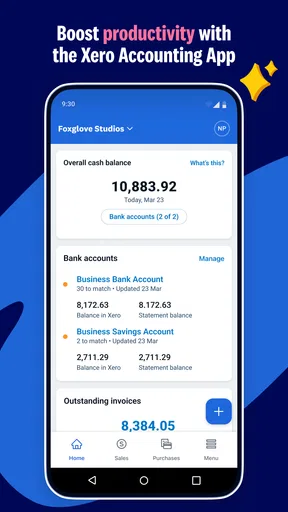
Firing up Xero Accounting for the first time felt like stepping into a minimalist tech paradise. The user interface is sleek, intuitive, and, dare I say, pleasing to the eye. It's got this calming blue and white theme going on that really helps keep the stress levels down as you dive into your finances.
Worth Reading Before You Choose

EA SPORTS FC Mobile 26 Is a Bigger Football Game, but It Takes Time

Flipboard Shows What News Apps Must Do Beyond the Feed

Switching to Android Auto Means Rethinking Your Driving Routine

Google Calendar Makes a Crowded Week Easier to Manage

Ludo King Makes the Most of the Minutes Between Plans

Baby Panda World Brings Quick Play to Modern Phones, but Its Game Library Feels Busy
The setup process was a breeze. I appreciated how the app walked me through the initial steps without overwhelming me with jargon. For someone who’s not a finance guru, this was a big win.
Features That Stand Out
Now, let's get into the nitty-gritty. What makes Xero shine are its features. From invoicing to bank reconciliation, it packs a punch.
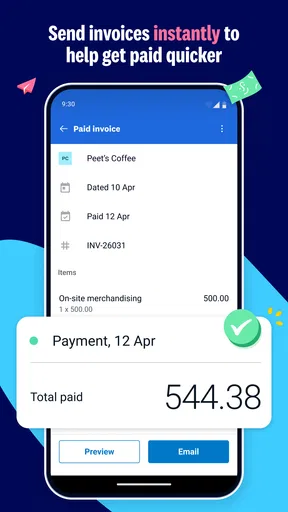
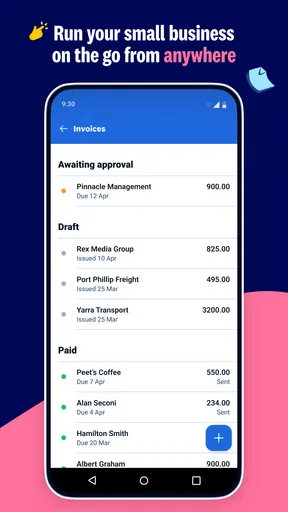
- Invoicing: Creating invoices is super easy. You can customize them with your logo, which adds that professional touch. Plus, sending them directly from the app means no more juggling between different platforms.
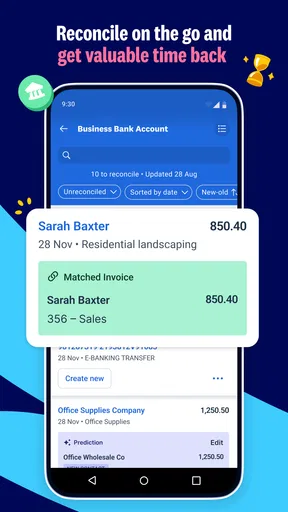
- Bank Reconciliation: This feature is a lifesaver. You can connect your bank accounts directly to Xero, and it automatically imports your transactions. Matching these with your records is as simple as a click. No more manual data entry!
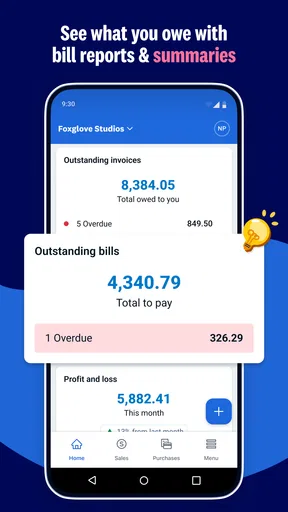
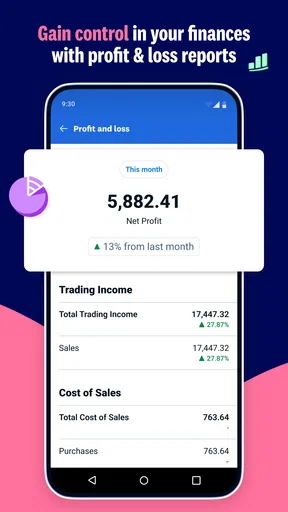
- Real-Time Reporting: Want to see how your business is performing at a glance? Xero provides real-time reports that keep you in the loop with your cash flow, profits, and losses.
Collaboration Made Easy
If you’re working with an accountant or a team, Xero’s got your back. Adding team members and sharing access is straightforward. Everyone can work on the same data without sending files back and forth. It's like having a financial command center.
Mobile App Experience
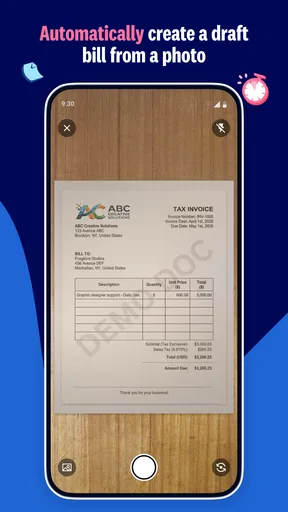
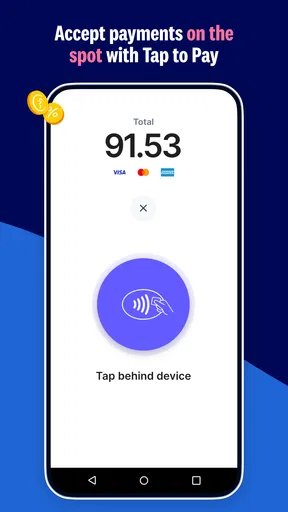
On the go? Xero’s mobile app is just as robust as its desktop counterpart. Whether you're traveling or just out grabbing coffee, you can manage invoices, check bank statements, and even capture receipts directly from your phone. It's a bit like having your accountant in your pocket.
Small habits that prevent cleanup later
One useful habit is to write a short, recognizable note when an expense is recorded, rather than relying on memory at month-end. A transaction amount may be obvious, but its business purpose can become hard to recall once several similar purchases appear. I would also review imported transactions before treating a suggested match as final; automation saves entry time, but it does not know the context of every payment.
For invoicing, I’d keep the customer details and item wording consistent from one invoice to the next. That makes the record easier to scan and reduces avoidable edits. Before sending, I would check the recipient, amounts, and description on the phone screen rather than assuming a previous invoice is a perfect template. A quick review is a better shortcut than correcting a mistake later.
A realistic week in the app
Imagine I finish a job at a client’s office, buy a business supply on the way back, and have another invoice to send before the day ends. I can use the mobile app to capture the receipt while I still know what the purchase was for, prepare the invoice, and later compare imported bank activity with the records I have made. The key is separating those actions: recording an expense is not the same as confirming that a bank transaction has been reconciled.
At the end of the week, I would look at the reports as a way to spot questions, not as unquestionable answers. If cash flow looks tighter than expected, I’d check whether an invoice remains unpaid or an expense has been entered twice before drawing conclusions. That small pause is where bookkeeping becomes useful decision support rather than just a collection of totals.
Settings and choices worth checking
Before relying on bank imports, I would confirm that the accounts I want to use are connected and that the transactions appearing in the app are current enough for my routine. Bank connection availability and behavior can depend on the financial institution, so I would test the process with real, ordinary activity before depending on it for a deadline. If I prefer not to connect an account, I can still use the app for other bookkeeping tasks, but should expect less automation in matching bank activity.
I would also decide early who genuinely needs access. Shared records are useful for an accountant or colleague, but access should match each person’s role rather than being handed out casually. Agreeing on who creates invoices, who reviews transactions, and who checks reports prevents duplicated work and conflicting assumptions. For a solo business, keeping the workflow simple is often better than adding collaborators just because the option exists.
Where the convenience has limits
Mobile bookkeeping is excellent for capturing information and handling straightforward tasks, but I would not force every detailed review onto a small screen. If I need to compare a long run of transactions, inspect a report closely, or make several connected corrections, a larger display may be more comfortable. The phone is strongest as a way to keep records moving; it need not be the only place I do accounting.
There is also a difference between an app being easy to navigate and accounting itself being effortless. Reconciliation still depends on careful matching, and reports are only as useful as the underlying entries. A new user may need time to learn which records belong where, particularly if moving from a spreadsheet or another system. I’d start with a few common tasks, review the results, and expand the routine once the basics make sense.
Learning Curve and Support
While Xero is user-friendly, there’s still a bit of a learning curve if you’re completely new to accounting software. But the good news is, they offer tons of resources. Their help center, webinars, and community forums are treasure troves of information. So, if you ever find yourself scratching your head, help is just a click away.
Plus, their support team is pretty responsive, which is a huge plus in my book. Knowing there’s someone to help out when you hit a snag makes all the difference.
When I would choose something else
If I had only a handful of transactions and no need for invoices, a basic spreadsheet could be quicker to maintain than learning an accounting workflow. If my main need were sending polished invoices and nothing more, a focused invoicing tool might be simpler. On the other hand, a business that wants expenses, invoices, bank reconciliation, and reporting in one bookkeeping environment has a clearer reason to consider Xero. The right choice depends less on feature count than on which tasks I will actually keep up with.
I would also avoid switching systems casually in the middle of a busy period. Moving records is a bookkeeping decision, not just an app download: I’d first decide how existing invoices, expense history, and bank activity should be handled, then test the new routine before relying on it for important reporting. That is particularly worthwhile if an accountant already works with my current records.
Final Thoughts
To wrap it up, Xero Accounting has really streamlined my business finances. It’s packed with features that cater to both small businesses and larger enterprises, making it versatile and scalable. The ease of use and the ability to access my financial data anywhere, anytime, gives me the peace of mind I didn’t know I needed.
If you’re on the fence about trying out an accounting app, I’d say give Xero a shot. It might just become your new best friend in business. Cheers to hassle-free accounting!
My mastery verdict
For me, the strongest case for Xero is not that it makes accounting disappear; it gives everyday bookkeeping a place to happen before details go stale. I’d recommend it to a small-business owner who wants to invoice from a phone, keep expenses visible, and make regular reconciliation part of the week. I’d skip it if I only needed a simple spending list or wanted software to make accounting judgments without my review.
Try it with a modest routine first: create an invoice, record an actual expense, and inspect how the bank activity fits into your records. If that sequence feels clear and saves you from chasing paperwork, the app is doing useful work. If it adds complexity without solving a real bookkeeping problem, a simpler alternative may be the more sensible choice.
Pros
- User-friendly interface for easy navigation.
- Real-time financial data synchronization.
- Comprehensive reporting features included.
- Seamless integration with other apps.
- Cloud-based access from any device.
Cons
- Limited offline functionality available.
- Higher cost compared to some competitors.
- Occasional sync issues with bank feeds.
- Requires a stable internet connection.
- Advanced features may need training.
FAQs for Xero Accounting for business
What features does Xero Accounting offer for small businesses?
Xero Accounting provides a comprehensive suite of features designed for small businesses, including invoicing, expense tracking, bank reconciliation, and financial reporting. It also offers payroll management, inventory tracking, and integration with third-party apps to streamline business operations. Xero’s cloud-based platform allows users to access their data from anywhere, ensuring flexibility and efficiency.
Is Xero Accounting user-friendly for beginners?
Yes, Xero Accounting is known for its user-friendly interface, which is ideal for beginners. The platform offers a clean, intuitive dashboard with easy navigation. Additionally, Xero provides extensive tutorials and customer support to help new users get accustomed to its features quickly. This makes it accessible for those with little to no accounting experience.
Can Xero Accounting be used on mobile devices?
Absolutely, Xero Accounting offers a mobile app available for both Android and iOS devices. The mobile app allows users to manage their finances on the go, including sending invoices, recording expenses, and viewing cash flow. This flexibility ensures that business owners can stay connected to their financial data anytime, anywhere.
How secure is Xero Accounting in terms of data protection?
Xero Accounting prioritizes data security with robust measures in place. It uses bank-grade encryption to protect sensitive information and offers two-step authentication for an added layer of security. Regular security updates and compliance with international standards ensure that your financial data remains safe and confidential.
What kind of customer support does Xero Accounting provide?
Xero Accounting offers a variety of customer support options, including 24/7 online support through email and chat. The platform also provides a comprehensive help center with articles, guides, and tutorials. Additionally, users can access community forums to connect with other Xero users and exchange tips and advice.


